 PlateyGet the app
Workout Log Spreadsheet Template: Columns and Formulas
Build a workout log in Google Sheets or Excel: one row per set, the columns to keep, and formulas for volume and estimated 1RM, with a worked example.
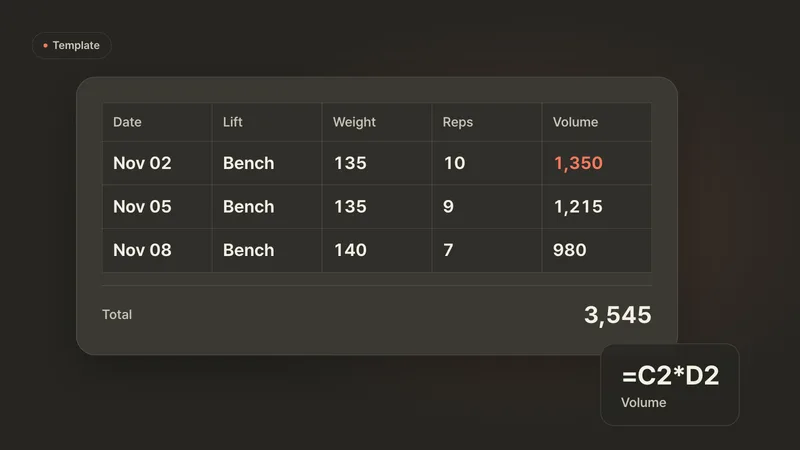
A workout log spreadsheet needs one row per set and seven input columns: date, exercise, set type, weight, reps, and optionally reps in reserve and a note. Two calculated columns, volume and estimated 1RM, turn the rows into numbers you can compare week to week. This works the same in Google Sheets and Excel; the functions below appear in both vendors' official function lists (checked Nov 28, 2026).
The columns
The formulas need a separate row for each set. Grouping a whole exercise or session into one row won't work.
| Column | Header | What goes in it | Example |
|---|---|---|---|
| A | Date | Session date, one format everywhere | 2026-11-28 |
| B | Exercise | Same spelling every time | Bench press |
| C | Set type | Working or Warm-up | Working |
| D | Weight (lb) | The load you moved, one unit | 135 |
| E | Reps | Reps completed in that set | 10 |
| F | RIR (optional) | Reps you had left | 2 |
| G | Notes (optional) | Anything odd about the set | long rests |
| H | Volume | Calculated: weight x reps | 1350 |
| I | Est 1RM | Calculated from weight and reps | 180.0 |
Keep the unit in the header and never mix lb and kg rows in one column. If your gym uses kg plates, log kg and label it kg; converting later is easier than untangling a mixed history. The reasoning for each column is in What to Write in a Workout Log.
The formulas
With headers in row 1 and data starting in row 2:
- Volume per set (H2):
=D2*E2 - Estimated 1RM per set (I2):
=D2*(1+E2/30) - Session volume:
=SUMPRODUCT(D2:D5,E2:E5) - Volume for one exercise:
=SUMIF(B2:B5,"Bench press",H2:H5) - Working sets only:
=SUMIF(C2:C5,"Working",H2:H5)
Google's function list gives the arguments in this order: SUMPRODUCT(array1, [array2, ...]) returns the sum of the products of corresponding entries, and SUMIF(range, criterion, [sum_range]) returns a conditional sum. Microsoft's alphabetical Excel list carries the same two function names. Fill H2 and I2 down the column; extend the range references as your data grows, or convert the range to a table so formulas pick up new rows.
Epley's formula gives you an estimated 1RM for tracking progress. Avoid treating the estimate as a weight to attempt. It gets less accurate at higher rep counts, as explained in 1RM Formulas. Leave column I empty on warm-up rows: an estimate from a light warm-up set is noise.
A worked example
One session, four working sets, all weights in lb:
| Exercise | Weight | Reps | RIR | Volume (H) | Est 1RM (I) |
|---|---|---|---|---|---|
| Bench press | 135 | 10 | 2 | 1350 | 180.0 |
| Bench press | 135 | 10 | 1 | 1350 | 180.0 |
| Bench press | 135 | 9 | 0 | 1215 | 175.5 |
| Squat | 185 | 5 | 2 | 925 | 215.8 |
Check the arithmetic by hand: 135 x 10 = 1350, and 135 x (1 + 10/30) = 180.0. For the four rows above, SUMPRODUCT(D2:D5,E2:E5) gives 1350 + 1350 + 1215 + 925 = 4840 lb of session volume, and SUMIF(B2:B5,"Bench press",H2:H5) gives 3915 lb for the bench alone.
Rows 1 and 2 have identical weight and reps. The RIR entry tells you that on row 2, the lifter was one rep closer to the limit. Weeks later, that column is the only way to tell those sets apart.
Where a spreadsheet starts to hurt
You can use this template for a long time. A few limits may eventually get in your way:
- Three exercises, five sets, three sessions a week is 45 rows a week, over 2,000 rows a year. Filtering to "bench press, last eight weeks" becomes manual work.
- Session volume adds squat pounds to curl pounds. You get a consistent total, but those pounds represent different work. Compare totals for each exercise separately.
- The sheet records what you lifted. Choosing your next weight is up to you. If you want a rule for that, Double Progression works with exactly these columns.
You can start with a spreadsheet and use these limits to judge when you've outgrown it.
If you move to an app later
Match the app's export to these columns before you commit: date, exercise, set type, weight, reps, and ideally RIR and notes. If the export carries those, your history stays readable in any spreadsheet and you are never locked in. Check the export format on the vendor's own page, export once while you still use the sheet, and keep the file.
Platey, the app we make, exports sets, RPE and notes to CSV, and workout history and settings to JSON, so a log kept there can come back out in the same shape as this template.
Summary
- One row per set; columns for date, exercise, set type, weight, reps, plus optional RIR and notes.
- Volume is
weight x reps;SUMPRODUCTtotals a session andSUMIFfilters by exercise or set type. - Epley's
weight x (1 + reps/30)is a tracking reference, not an attempt weight; skip it on warm-ups. - Use the same weight unit throughout and make sure you can export your log so you can keep using the template when you switch apps.